视频地址:https://www.bilibili.com/video/BV1DJ411m7NR
原创整理.
MarkDown格式下载地址(内富视频内的PPT+源码):https://wwa.lanzous.com/ipc5Xl5zvcj
1. NIO与IO的区别
NIO:New IO
1.4就有NIO了,1.7对NIO进行了改进。1.7对NIO的改动,称之为NIO2.NIO在现在企业中使用的比较多。
NIO的几个概念:
- 原来的IO是面向流,是单向传输。
- NIO是双向的传输。
2. 缓冲区
缓冲区(Bufffer):在JavaNIO中负责数据的存储。缓冲区就是数组。用于存储不同类型的数据。根据数据的不同,提供了相应类型的缓冲区。(Boolean类型除外,其他的7个基本类型都有)有:
1
| ByteBuffer ; CharBuffer ; ShortBuffer ; IntBuffer ; LongBuffer ; FloatBuffer ; DoubleBuffer
|
上述缓冲区的管理方式都几乎一致。通过allocate();获取缓冲区最常用的就是ByteBuffer
2.1. 缓冲区的基本属性
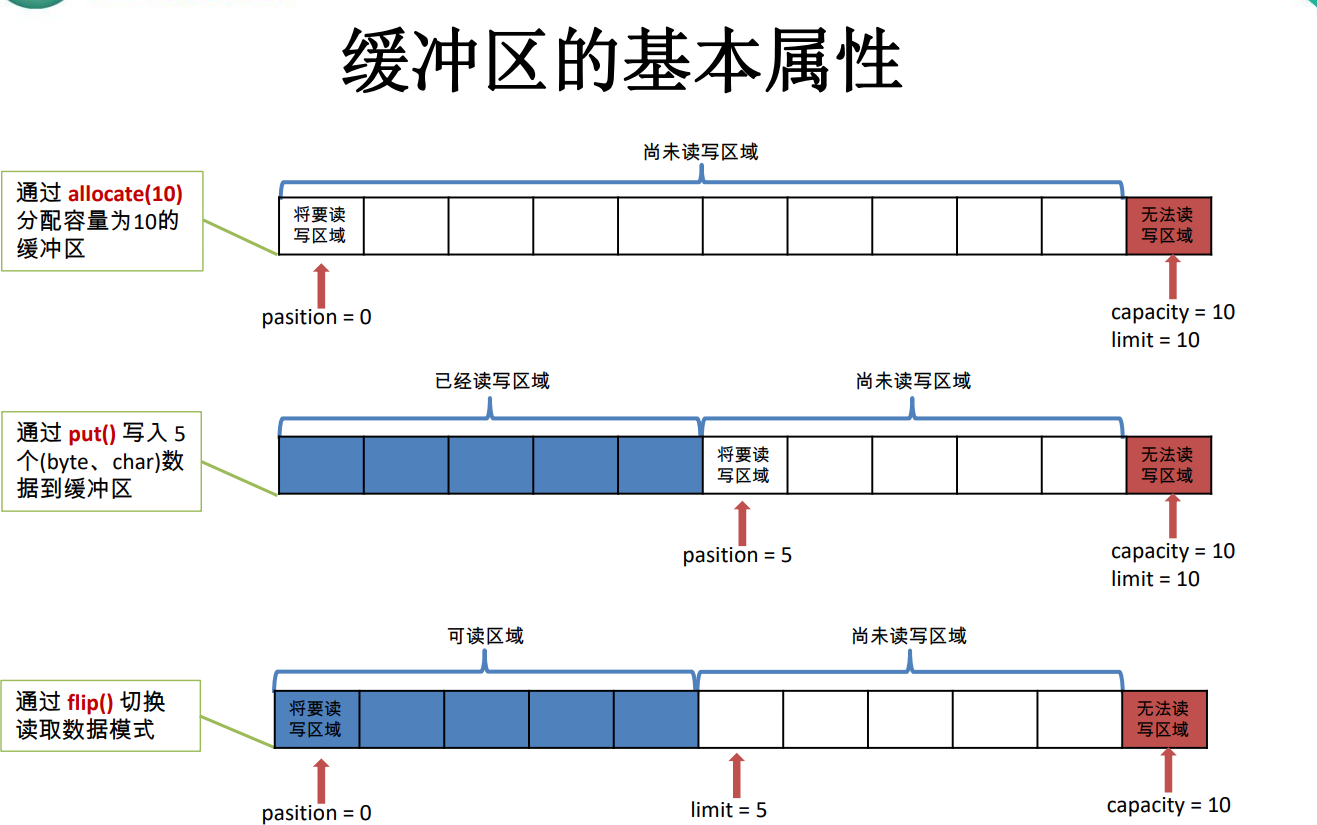
- 分配一个指定大小的缓冲区:
ByteBuffer byteBuffer = ByteBuffer.allocate(10);//获取一个10字节大小的缓冲区 - 从缓冲区存取数据的两个核心方法:
get();和put();
byteBuffer.put(“abcde”.getBytes());//存5个Byte的数据
byterBuffer.get(); - 缓冲区的几个核心属性:
- capacity:容量,表示缓冲区中最大的容量,一旦生命,不得改变!
- limit:界限,第一个不应该读取或写入的数据的索引,即位于 limit 后的数据 不可读写。缓冲区的限制不能为负,并且不能大于其容量。
- position:位置,表示缓冲区中正在操作数据的位置。(即将要操作的位置,position下的位置是空的)
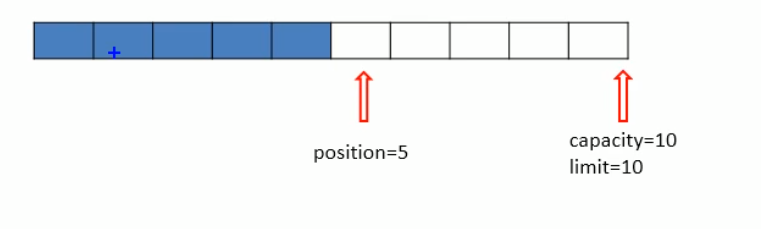 4. (position <= limit <= capacity)
2.2. flip方法(切换读数据模式)
flip方法:可以切换到读数据模式。
切换到读取模式的时候,即切换到读模式,则position变为0,limit变为数据最大的位置。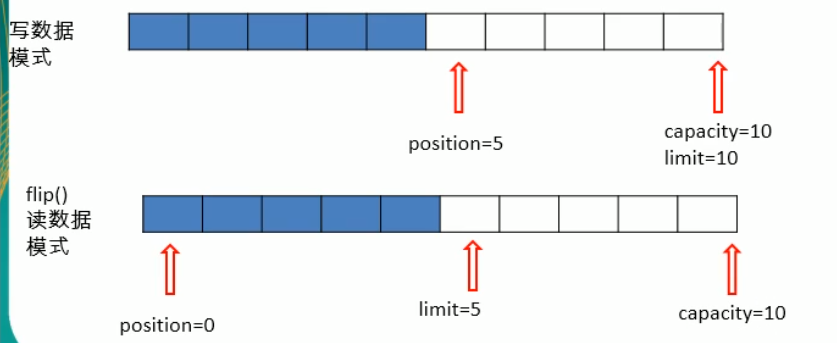
2.3. 读取Buffer数据
1
2
3
| byteBuffer.flip();//切换到读模式
byte[] data = new byte[byteBuffer.limit()];
byteBuffer.get(data);//获取数据
|
get完成之后,各个属性的位置变化情况为?
- position:变为读之前的limit
- limit:不变
- capacity:不变
2.4. Buffer常用方法
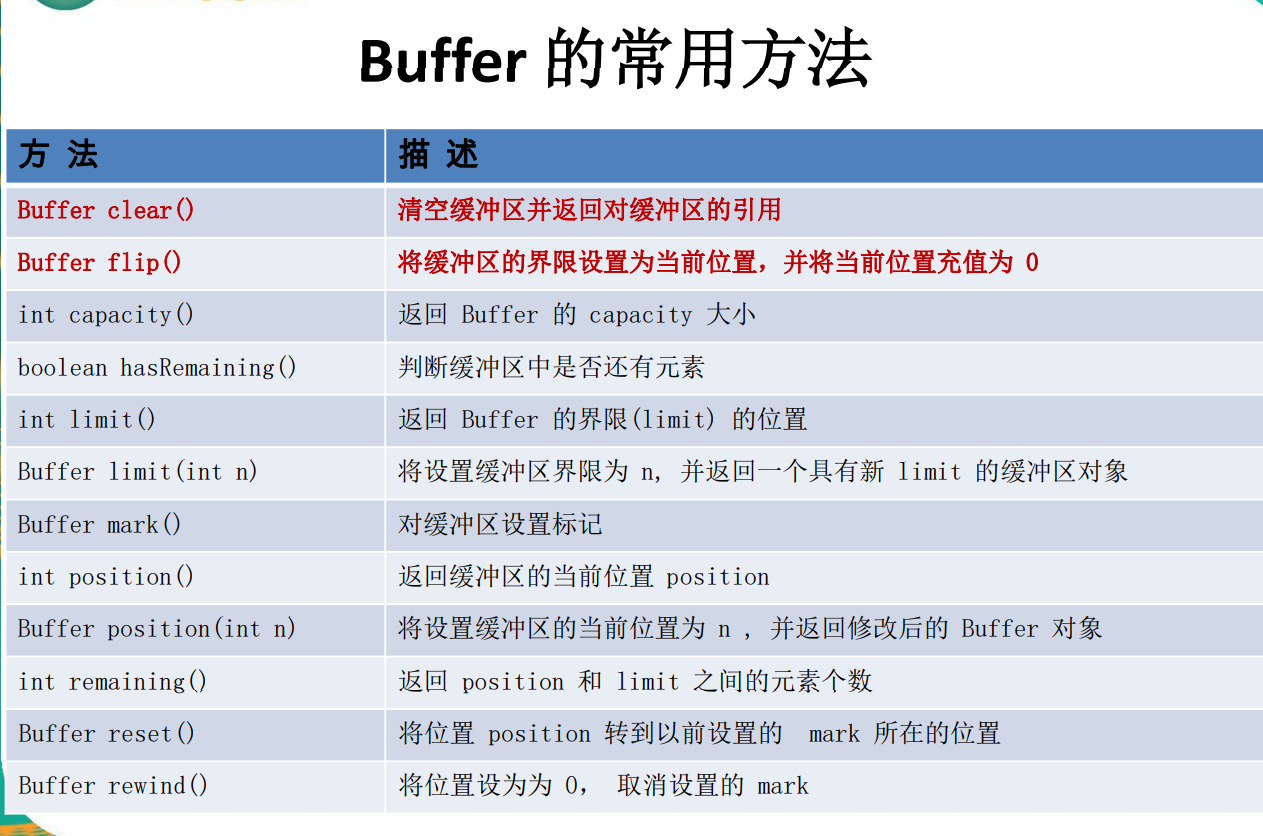 rewind:倒带,倒片。可重复读取数据,将position改为0。可以再次读取。clear:清空,将buffer中的数据清空。将limit变为capacity,但是缓冲区的数据仍然在,数据处在
被遗忘状态,只不过是将limit置为capacity,可以再次重新写入。mark:标记。记录此时的position。reset:把position恢复到上次mark的位置。remaining:获取还可以操作的缓冲区的数量(即 limit - position)hasRemaining:返回一个boolean值,是否还有剩余的位置可以读取(即 return (limit - position) > 0 ? true : false;)**总结,缓冲区的四个核心属性:**0 <= mark <= position <= limit <= capacity
3. 直接缓冲区和非直接缓冲区
- 非直接缓存区:通过allocate() 方法分配缓冲区,将缓冲区建立在JVM的内存中。
- 直接缓冲区:通过allocateDirect() 方法分配缓冲区,将缓冲区直接建立在物理内存中。 可以提高效率
**直接缓冲区,只有ByteBuffer支持,其他Buffer不支持!**非直接缓存区: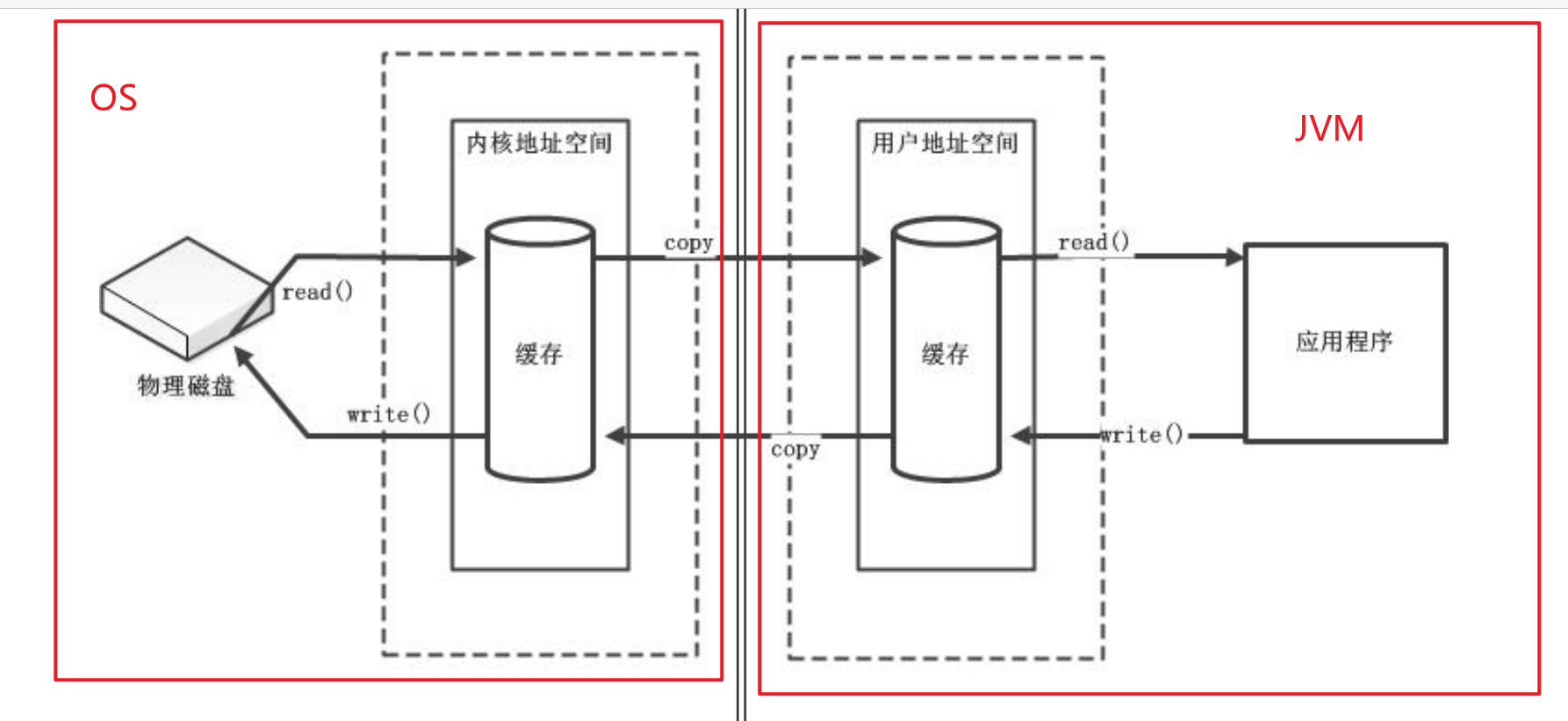
直接缓存区: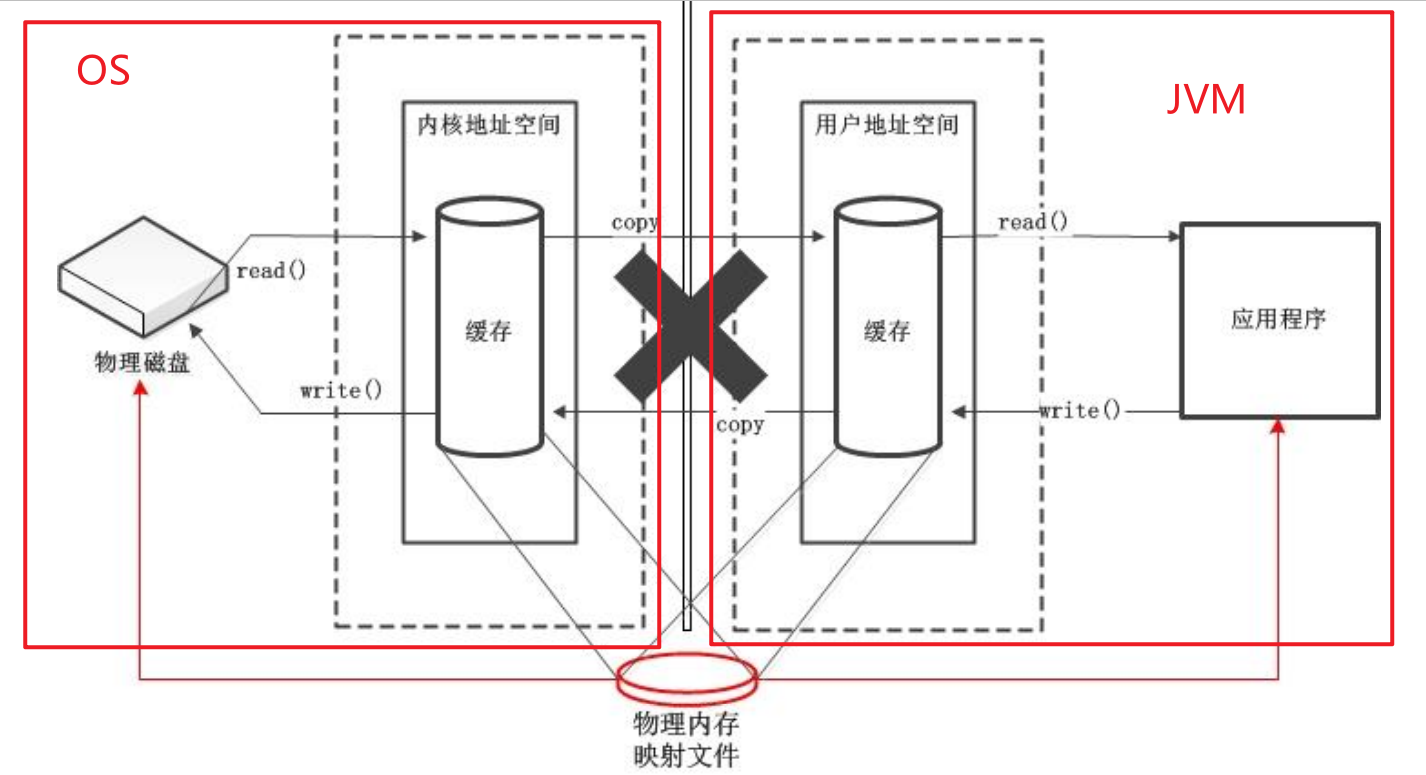
3.1. 创建两种缓冲区
1
2
| ByteBuffer.allocate(1024);//创建非直接缓冲区
ByteBuffer.allocateDirect(1024);//创建直接缓冲区
|
如何判断缓冲区是否为直接缓冲区?
1
2
| byteBuffer.isDirect();
//返回一个boolean,true是直接缓冲区,false是非直接缓冲区
|
4. 通道
通道(Channel):由 java.nio.channels 包定义 的。Channel 表示 IO 源与目标打开的连接。 Channel 类似于传统的“流”。只不过 Channel 本身不能直接访问数据,Channel 只能与 Buffer 进行交互。
Java 为 Channel 接口提供的最主要实现类如下
- FileChannel:用于读取、写入、映射和操作文件的通道。
- DatagramChannel:通过 UDP 读写网络中的数据通道。
- SocketChannel:通过 TCP 读写网络中的数据。
- •ServerSocketChannel:可以监听新进来的 TCP 连接,对每一个新进来 的连接都会创建一个 SocketChannel
4.1 获取通道的三种方式:
- Java针对支持通道的类提供了getChannel()方法来获取通道支持通道的类如下:
- FileInputStream
- FileOutputStream
- RandomAccessFile
- DatagramSocket
- Socket
- ServerSocket
- 获取通道的其他方式是使用 Files 工具类的静态方法 newByteChannel() 获取字节通道。
- 或者通过通道的静态方法 open() 打开并返回指定通道。
(2和3都是JDK1.7以后的NIO2才支持这种方法)第二种获取DirectBuffer的方式:使用FileChannel的map()方法将文件区域直接映射到内存中来创建。该方法返回 MappedByteBuffer 。
1
2
| MappedByteBuffer mappedByteBuffer = inChannel.map(MapMode.READ_ONLY,0,inChannel.size());
//只读模式 从0 到size
|
4.2. 通过getChannel()获取通道
1
2
3
4
5
6
7
8
9
10
11
12
13
14
15
16
17
18
| //获取文件流
FileInputStream fileInputStream = new FileInputStream("1.jpg");
FileOutputStream fileOutputStream = new FileOutputStream("2.jpg");
//获取文件通道
FileChannel fileInputChannel = fileInputStream.openChannel();
FileChannel fileOutputChannel = fileOutputStream.openChannel();
//获取一个Buffer
ByteBuffer byteBuffer = ByteBuffer.allocate(1024);
while((fileInputChannel.read(byteBuffer)) != -1){
byteBuffer.flip();//切换到读模式
fileOutputChannel.wirte(byteBuffer);
byteBuffer.clear();//清空buf
}
//关闭通道
fileOutChannel.close();
fileInputChannel.close();
fileInputStream.close();
fileOutputStream.close();
|
4.3. 使用Channel的open()方法类获取通道
使用直接缓冲区完成文件的复制(内存映射文件)
MappedByteBuffer是内存映射文件,道理和ByteBuffer.allocateDirect();一摸一样。MappedByteBuffer是在物理内存中。内存映射文件,只有ByteBuffer支持。映射的字节缓冲区及其表示的文件映射在缓冲区本身被垃圾收集之前保持有效。映射字节缓冲区的内容可以随时改变,例如,如果该程序或其他程序改变了映射文件的相应区域的内容。 这些变化是否发生以及何时发生,取决于操作系统,因此未指定。映射字节缓冲区的行为与普通直接字节缓冲区没有区别。
1
2
3
4
5
6
7
8
9
10
11
12
13
14
15
16
17
18
19
20
21
22
| FileChannel inChannel = FileChannel.open(Paths.get("d:/1.mkv"), StandardOpenOption.READ);
FileChannel outChannel = FileChannel.open(Paths.get("d:/2.mkv"), StandardOpenOption.WRITE, StandardOpenOption.READ, StandardOpenOption.CREATE);
//StandardOpenOption是一个枚举类,其中有多个选项,用于设置该通道的作用
//如读取:StandardOpenOption.READ
//如读和写,则可利用Java的不定参数:
//其中:StandardOpenOption.CREATE_NEW的类型意为
// |— 如果存在就报错,如果不存在就新建
//FileChannel.open("d:/1.mkv",StandardOpenOption.READ,StandardOpenOption.WRITE);
//可以利用channel.map()获取内存映射文件Buffer
//MappedByteBuffer是内存映射文件,道理和ByteBuffer.allocateDirect();一摸一样
//MappedByteBuffer是在物理内存中。
//内存映射文件,只有ByteBuffer支持!
MappedByteBuffer inMappedBuf = inChannel.map(MapMode.READ_ONLY, 0, inChannel.size());
MappedByteBuffer outMappedBuf = outChannel.map(MapMode.READ_WRITE, 0, inChannel.size());
//MapMode 也是一个选项枚举类
//直接对缓冲区进行数据的读写操作
byte[] dst = new byte[inMappedBuf.limit()];
inMappedBuf.get(dst);
outMappedBuf.put(dst);
//关闭通道
inChannel.close();
outChannel.close();
|
4.4. transferFrom和transferTo方法
- transferFrom -> transferFrom(ReadableByteChannel src, long position, long count) 从给定的可读字节通道将字节传输到此通道的文件中。
- transferTo -> transferTo(long position, long count, WritableByteChannel target) 将字节从此通道的文件传输到给定的可写字节通道。
1
2
3
4
5
6
7
8
9
10
11
12
| FileChannel inChannel = FileChannel.open(Paths.get("d:/1.mkv"), StandardOpenOption.READ);
FileChannel outChannel = FileChannel.open(Paths.get("d:/2.mkv"), StandardOpenOption.WRITE, StandardOpenOption.READ, StandardOpenOption.CREATE);
//transferTo与transferFrom是一个效果
//inChannel.transferTo(0, inChannel.size(), outChannel);
//从0开始读取,读取到inChannel.size()位置,输出给outChannel
outChannel.transferFrom(inChannel, 0, inChannel.size());
//从inChannel获取,从第0个开始获取,获取到inChannel.size()大小的位置
//channel.size(); -> 返回此通道文件的当前大小,以字节为单位。
//FileChannel实例的size()方法将返回该实例所关联文件的大小。如:
//long fileSize = channel.size();
inChannel.close();
outChannel.close();
|
5. 分散与聚集
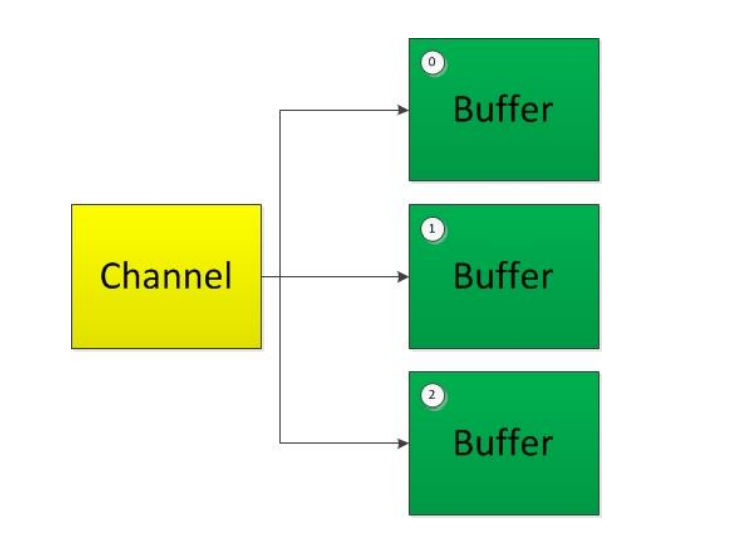
- 分散(Scatter)
- 分散读取(Scatter Reads):将通道中的数据分散到多个缓冲区中
- 聚集(Gather)
- 聚集写入(Gather Writes):将多个缓冲区中的数据聚集到一个通道中
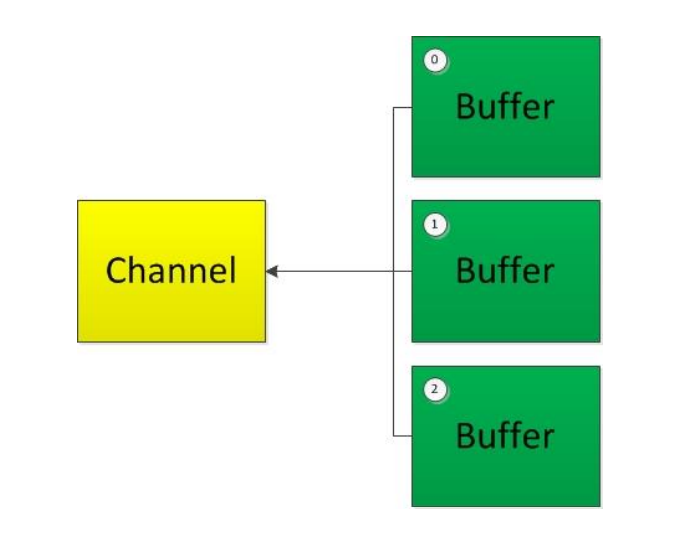
分散读取/聚集写入,都是按照顺序进行操作的
5.1. 分散读取
1
2
3
4
5
6
7
8
9
10
11
12
13
14
15
16
17
| RandomAccessFile raf = new RandomAccessFile("1.txt","rw");
//1.获取通道
FileChannel fileChannel = raf.getChannel();
//创建一个缓冲区
ByteBuffer byteBuffer1 = ByteBuffer.allocate(100);
ByteBuffer byteBuffer2 = ByteBuffer,allocate(1024);
//通过分散读取进行读取
ByteBuffer[] bufs = {byteBuffer1,byteBuffer2};
fileChannel.read(bufs);
for(ByteBuffer bb : bufs){
bb.flip();//切换到读模式
}
//输出前100个字节
System.out.println(new String(bufs[0].array(),0,bufs[0].limit()));
//输出后1024个字节
System.out.println(new String(bufs[1].array(),0,bufs[1].limit()));
/* 通过结果我们可以看到,分散读取的确是按照顺序写入的 */
|
5.2. 聚集写入
1
2
3
4
5
6
7
8
9
10
11
12
13
14
15
16
17
18
19
| RandomAccessFile raf = new RandomAccessFile("1.txt","rw");
RandomAccessFile raf2 = new RandomAccessFile("2.txt","rw");
//1.获取通道
FileChannel fileChannel = raf.getChannel();
FileChannel fileChannel2 = raf2.getChannel();
//创建一个缓冲区
ByteBuffer byteBuffer1 = ByteBuffer.allocate(100);
ByteBuffer byteBuffer2 = ByteBuffer.allocate(1024);
ByteBuffer[] bufs = {byteBuffer1,byteBuffer2};
fileChannel.read(bufs);//从文件中读取数据到bufs
for(ByteBuffer bb : bufs){
bb.flip();//切换到读模式
}
fileChannel2.write(bufs)
fileChannel.close();
fileChannel2.close();
raf.close();
raf2.close();
//最终还是会按照顺序进行写入
|
6. 字符集(Charset)编码与解码
- 编码:字符串转换成字节数组的过程
- 解码:字节数组转换成字符串的过程
Java中提供了Charset类(java.nio.charset.Charset)
1
| Map<String,Charset> charsets = Charset.availableCharsets();//获取所有支持的编码。(构造从规范字符集名称到字符集对象的有序映射。 )
|
获取编码器和解码器:
1
2
3
4
5
6
7
8
9
10
11
12
13
14
15
| Charset charset = Charset.fromName("GBK");
CharsetEncoder ce = charset.newEncoder();
CharsetDecoder cd = charset.newDecoder();
CharBuffer charBuffer = CharBuffer.allocate(1024);
charBuffer.put("尚硅谷威武!");
charBuffer.flip();//切换读模式
//编码
ByteBuffer byteBuffer = ce.encode(charBuffer);
byteBuffer.flip();//切换成读模式
for(int i=0;i<byteBuffer.limit;i++{
System.out.println(byteBuffer.get);
}
byteBuffer.reset();//重置position指针
//解码
charBuffer = cd.decode(byteBuffer);
|
7. NIO的非阻塞式网络通信
- 传统的 IO 流都是阻塞式的。也就是说,当一个线程调用 read() 或 write() 时,该线程被阻塞,直到有一些数据被读取或写入,该线程在此期间不 能执行其他任务。因此,在完成网络通信进行 IO 操作时,由于线程会 阻塞,所以服务器端必须为每个客户端都提供一个独立的线程进行处理, 当服务器端需要处理大量客户端时,性能急剧下降。
- Java NIO 是非阻塞模式的。当线程从某通道进行读写数据时,若没有数 据可用时,该线程可以进行其他任务。线程通常将非阻塞 IO 的空闲时 间用于在其他通道上执行 IO 操作,所以单独的线程可以管理多个输入 和输出通道。因此,NIO 可以让服务器端使用一个或有限几个线程来同 时处理连接到服务器端的所有客户端。
7.1. 选择器
选择器(Selector) 是 SelectableChannle 对象的多路复用器,Selector 可 以同时监控多个 SelectableChannel 的 IO 状况,也就是说,利用 Selector 可使一个单独的线程管理多个 Channel。Selector 是非阻塞 IO 的核心。
SelectableChannle 的结构如下图: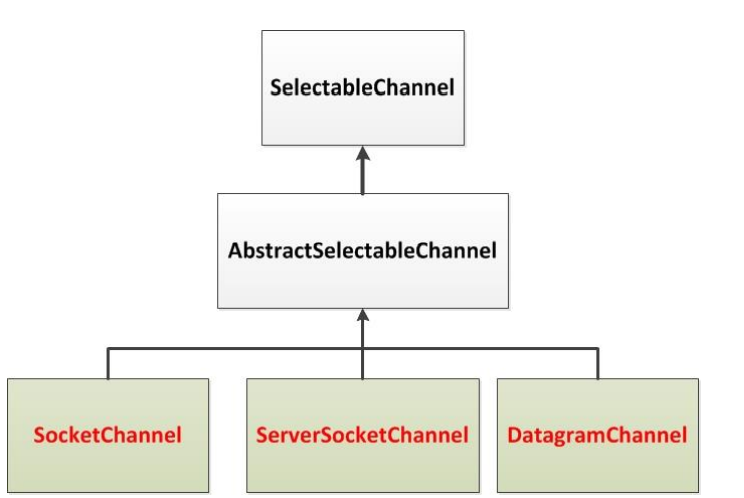 **选择器的作用:**当客户端发送的通道的数据完全准备就绪之后,选择器才会将该任务分配到服务端的一个或多个线程上。
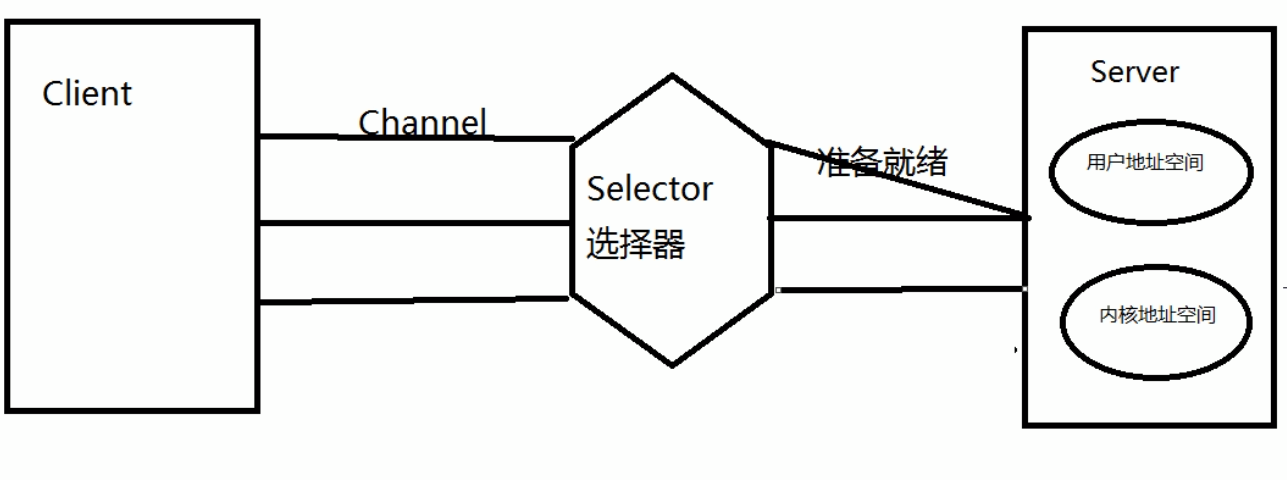 也就意味着,当客户端的数据未准备就绪,服务端不会处理该任务,就不会占用线程。更能利用CPU的资源
使用NIO完成网络通信的三个核心:
- 通道:负责连接
java.nio.channels.Channel |—SelectableChannel |—SocketChannel |—ServerSocketChannel |—DatagramChannel |—Pipe.SinkChannel |—Pipe.SourceChannel - 缓冲区:数据的存取
- 选择器:是SelectableChannel的多路复用器,用于监控SelectableChannel的IO状况
SelectionKey:选择件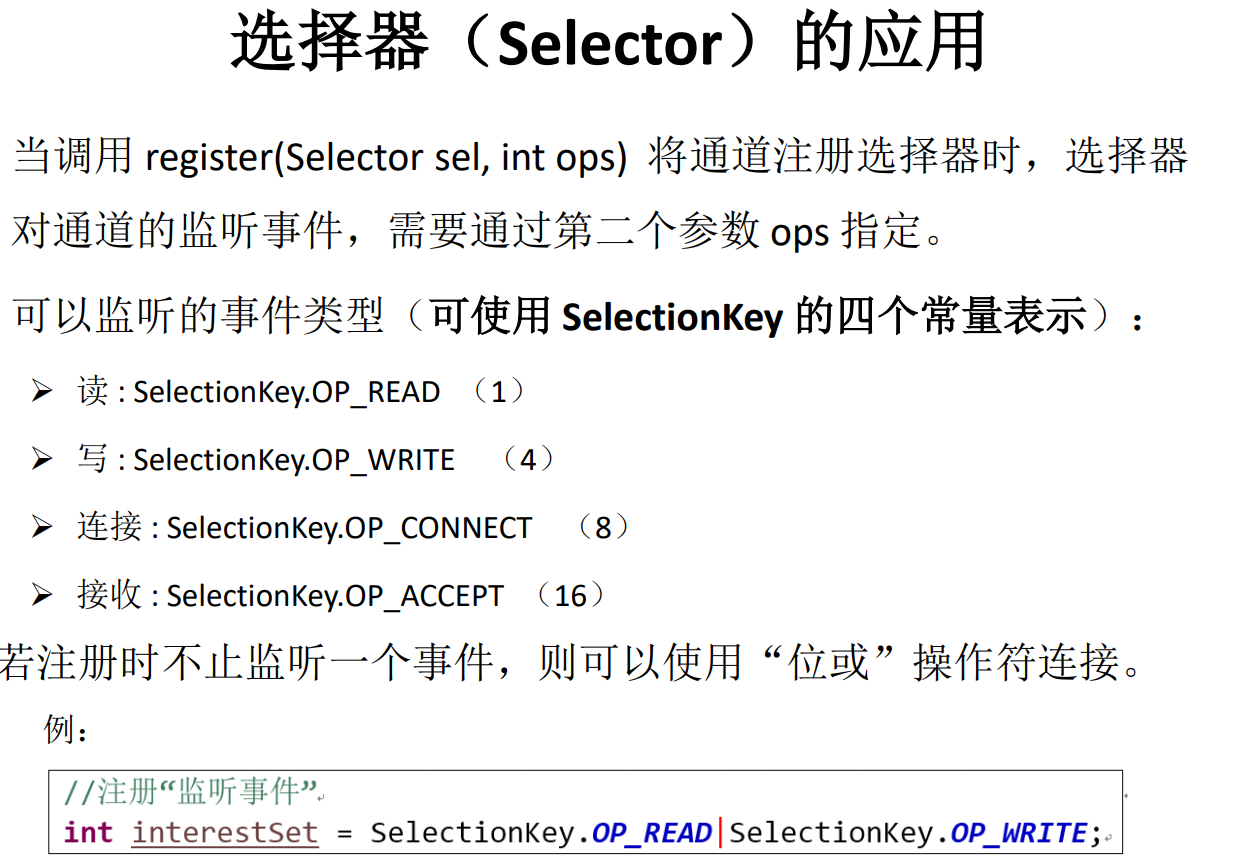
TCP通信:
1
2
3
4
5
6
7
8
9
10
11
12
13
14
15
16
17
18
19
20
21
22
23
24
25
26
27
28
29
30
31
32
33
34
35
36
37
38
39
40
41
42
43
44
45
46
47
48
49
50
51
52
53
54
55
56
57
58
59
60
61
62
63
64
65
66
67
68
69
70
71
72
73
74
75
76
77
78
79
80
81
82
83
84
85
| //客户端
@Test
public void client() throws IOException{
//1. 获取通道
SocketChannel sChannel = SocketChannel.open(new InetSocketAddress("127.0.0.1", 9898));
//2. 切换非阻塞模式
sChannel.configureBlocking(false);
//3. 分配指定大小的缓冲区
ByteBuffer buf = ByteBuffer.allocate(1024);
//4. 发送数据给服务端
Scanner scan = new Scanner(System.in);
while(scan.hasNext()){
String str = scan.next();
buf.put((new Date().toString() + "\n" + str).getBytes());
buf.flip();
sChannel.write(buf);
buf.clear();
}
//5. 关闭通道
sChannel.close();
}
//服务端
@Test
public void server() throws IOException{
//1. 获取通道
ServerSocketChannel ssChannel = ServerSocketChannel.open();
//2. 切换非阻塞模式
ssChannel.configureBlocking(false);
//3. 绑定连接
ssChannel.bind(new InetSocketAddress(9898));
//4. 获取选择器
Selector selector = Selector.open();
//5. 将通道注册到选择器上, 并且指定"监听接收事件"
ssChannel.register(selector, SelectionKey.OP_ACCEPT);
//6. 轮询式的获取选择器上已经"准备就绪"的事件
while(selector.select() > 0){
//7. 获取当前选择器中所有注册的"选择键(已就绪的监听事件)"
Iterator<SelectionKey> it = selector.selectedKeys().iterator();
while(it.hasNext()){
//8. 获取准备"就绪"的是事件
SelectionKey sk = it.next();
//9. 判断具体是什么事件准备就绪
if(sk.isAcceptable()){
//10. 若"接收就绪",获取客户端连接
SocketChannel sChannel = ssChannel.accept();
//11. 切换非阻塞模式
sChannel.configureBlocking(false);
//12. 将该通道注册到选择器上
sChannel.register(selector, SelectionKey.OP_READ);
}else if(sk.isReadable()){
//13. 获取当前选择器上"读就绪"状态的通道
SocketChannel sChannel = (SocketChannel) sk.channel();
//14. 读取数据
ByteBuffer buf = ByteBuffer.allocate(1024);
int len = 0;
while((len = sChannel.read(buf)) > 0 ){
buf.flip();
System.out.println(new String(buf.array(), 0, len));
buf.clear();
}
}
//15. 取消选择键 SelectionKey
it.remove();
}
}
}
|
UDP通信:
1
2
3
4
5
6
7
8
9
10
11
12
13
14
15
16
17
18
19
20
21
22
23
24
25
26
27
28
29
30
31
32
33
34
35
36
37
38
39
40
41
42
43
44
45
46
47
48
49
50
51
52
| @Test
public void send() throws IOException{
DatagramChannel dc = DatagramChannel.open();
dc.configureBlocking(false);
ByteBuffer buf = ByteBuffer.allocate(1024);
Scanner scan = new Scanner(System.in);
while(scan.hasNext()){
String str = scan.next();
buf.put((new Date().toString() + ":\n" + str).getBytes());
buf.flip();
dc.send(buf, new InetSocketAddress("127.0.0.1", 9898));
buf.clear();
}
dc.close();
}
@Test
public void receive() throws IOException{
DatagramChannel dc = DatagramChannel.open();
dc.configureBlocking(false);
dc.bind(new InetSocketAddress(9898));
Selector selector = Selector.open();
dc.register(selector, SelectionKey.OP_READ);
while(selector.select() > 0){
Iterator<SelectionKey> it = selector.selectedKeys().iterator();
while(it.hasNext()){
SelectionKey sk = it.next();
if(sk.isReadable()){
ByteBuffer buf = ByteBuffer.allocate(1024);
dc.receive(buf);
buf.flip();
System.out.println(new String(buf.array(), 0, buf.limit()));
buf.clear();
}
}
it.remove();
}
}
|
8. Pipe管道
管道(Pipe):Java NIO 管道是2个线程之间的单向数据连接。 Pipe有一个source通道和一个sink通道。数据会 被写到sink通道,从source通道读取。
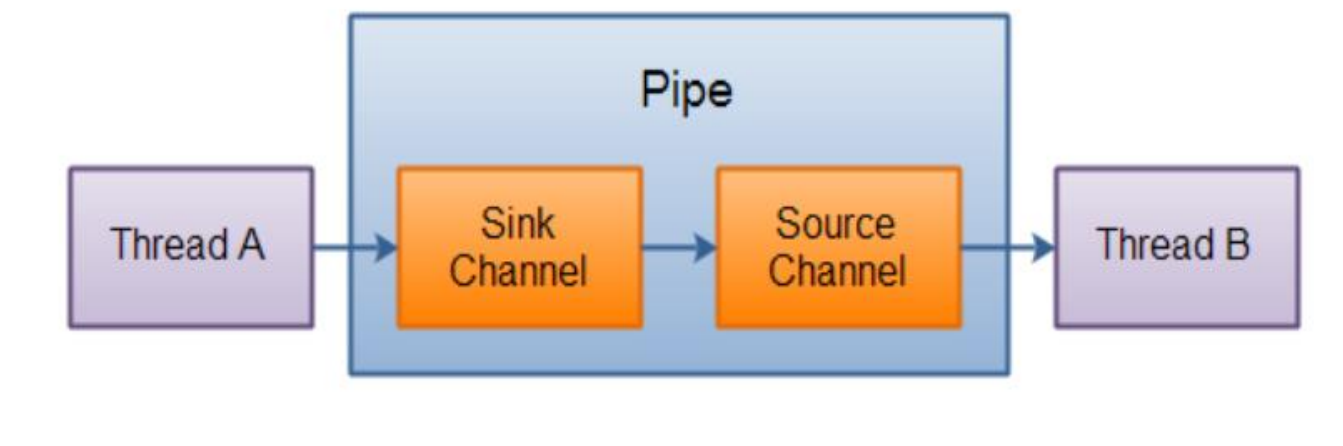
1
2
3
4
5
6
7
8
9
10
11
12
13
14
15
16
17
18
19
20
21
22
| @Test
public void test1() throws IOException{
//1. 获取管道
Pipe pipe = Pipe.open();
//2. 将缓冲区中的数据写入管道
ByteBuffer buf = ByteBuffer.allocate(1024);
Pipe.SinkChannel sinkChannel = pipe.sink();
buf.put("通过单向管道发送数据".getBytes());
buf.flip();
sinkChannel.write(buf);
//3. 读取缓冲区中的数据
Pipe.SourceChannel sourceChannel = pipe.source();
buf.flip();
int len = sourceChannel.read(buf);
System.out.println(new String(buf.array(), 0, len));
sourceChannel.close();
sinkChannel.close();
}
|